General Information
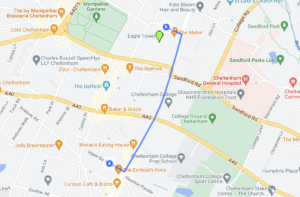
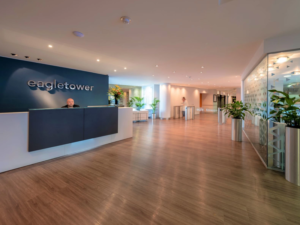
All our in-person courses currently take place at our assessment centre in central Cheltenham:
The Cyber Scheme, Eagle Tower, Montpellier Drive, Cheltenham GL50 1TA
Please organise your own accommodation if needed.
Bath Terrace Car Park (SatNav GL50 2BA) offers reasonable all day parking a few minutes’ walk away.
Our rooms are all accessible via lift. Please let us know if you have any accessibility issues.
Courses begin at 9.00am, please arrive 15 minutes before your start time to register.
Non-attendance
Please notify us if you are unable to attend or if you have any enquiries prior to the course date. Please read our terms and conditions for our cancellation policy.
Refreshments and lunch break
Drinking water is available onsite. Please note you will have a 60-minute lunch break. You can bring your own food, purchase from the onsite café (food, snacks, tea/coffee) or you can pop out for lunch. (We do not provide tea/coffee in the training room, please purchase from the onsite café.)
Equipment
Please supply your own laptop. We do not provide or have loan laptops. All tools and software must be licensed appropriately.
Essential/mandatory:-
- A laptop with at least 8Gig of memory with administrator credentials – so you can add software
- A NIC (network interface card) – so you can connect to the network
- A wireless NIC (network interface card) – so you can connect to the wireless network
- A HDMI port – so you can attach a monitor
- A working power supply – so you can use your laptop for extended periods of time
- A copy of a penetration testing distro i.e. Kali Linux (Virtualised might be best i.e. Virtual box)
- An office package for opening Word documents, PDFs and spreadsheets.
- A copy of vulnerability scanning software i.e. Nessus
- Software for zipping and unzipping documents.
Shown below are just some examples; other software and vendors are available.
- Virtual Box https://www.virtualbox.org/wiki/Downloads
- Kali Linux https://www.kali.org/downloads/
- Nessus https://www.tenable.com/products/nessus/nessus-essentials
**Please be aware of different types of Nessus licenses. Check how long any trial versions last and how many devices you can scan.
WireGuard VPN
Please install the Wireguard VPN client before the course begins.
Please note activating the VPN client outside of the training course timeslot will cause your device to lose access to the internet. This is by design. Simply turn off the VPN to re-enable your internet access. You can only use the internet through the Cyber Scheme VPN during the training course time slot, not before or after.
Windows
Browse to: https://www.wireguard.com/install/
Download and install the client then import the .conf (configuration file supplied by the Cyber Scheme).
Linux
apt update
apt install wireguard
You will be sent a config file from the Cyber Scheme.
Rename your .conf (configuration file supplied by the Cyber Scheme) to wg0.conf:
mv myfile.conf wg0.conf
To import the file use the following command:
nmcli connection import type wireguard file wg0.conf
Other client installation software options are available here – https://www.wireguard.com/install/
FAQs
Where should I install Nessus? – in Windows is fine.
What Nessus licence do I need? – any is fine, we recommend the free essentials licence. Please note Nessus Essentials has a limit to 5 IPs Addresses that can be used for vulnerability scans and only lasts for 30 days now.
Can I use any vulnerability assessment software? – Yes, use any you like. Alternative software is available.