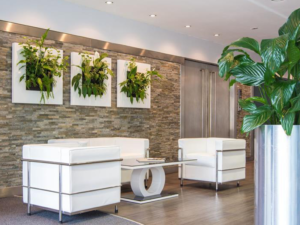
All our exams currently take place at our assessment centres in Cheltenham:
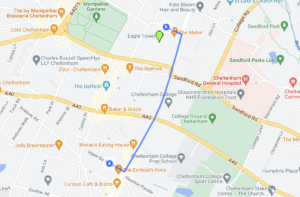
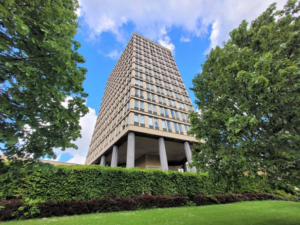
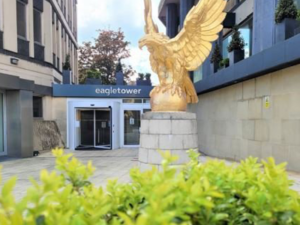
The Cyber Scheme, Eagle Tower, Montpellier Drive, Cheltenham GL50 1TA
Please organise your own accommodation if needed.
There is no on-site parking for candidates. Bath Terrace Car Park (SatNav GL50 2BA) offers reasonable all day parking within a few minutes’ walk. We are able to organise blue badge accessible parking for those who need it – please email us to book.
Our exam rooms are all accessible via lift. Please let us know if you have any accessibility issues.
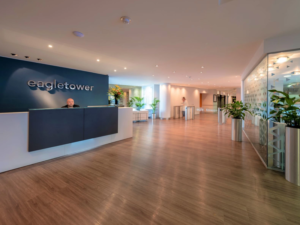
Exams begin at 9.00am, please check in at Eagle Tower reception at 8.45am. Our invigilator will accompany you to the exam room. Exams are normally completed by 5pm.
Photo-ID
You should bring a recognised photo-id (e.g. Passport or Driving Licence) and have this available throughout the test.
Assessment Outcome
Under normal circumstances, you will be notified of success or failure by email within one working week by The Cyber Scheme.
Non-attendance
Please notify us if you are unable to attend or if you have any enquiries prior to the exam date. Please read our terms and conditions for our cancellation policy.
Please bring:
A laptop (with power supply, HDMI output, RJ45 network interface card, wireless network interface card and administrator rights to add software.)
Hard drives will be erased (or retained) so please be prepared to remove them from your laptop at the end of the session. All drives that are installed in the laptop at the time of the test will need to be wiped.
Refreshments and lunch break
Water is available in the exam room. Please note you will only have a 30 minute lunch break, so we advise you bring your own food with you to save time – however there is a café onsite if you wish to purchase lunch, tea or coffee.
Exam Environment
Please bring a laptop with a penetration testing distro and tools with you. Tools can not be added or installed during the assessment. You will connect to the environment using a wired network connection.
Exam Environment FAQs
Where should I install Nessus? – in Windows is fine.
What Nessus licence do I need? – any is fine, we recommend the free essentials licence. Please note Nessus Essentials has a limit to 5 IPs Addresses that can be used for vulnerability scans and only lasts for 30 days now.
Can I use any vulnerability assessment software? – Yes, use any you like. Alternative software is available.
Do all candidates get their own network / devices to scan? – yes you cannot affect the other candidates.
Exam Format
- The practical assessment is open book, except the short report writing exercise. We will not allow report writing tools, AI or pre-prepared reports.
- The technical interview (as of 1/3/2026) is closed book however the questions can be downloaded here.
- The VIVA (interview) will involve being asked some technical questions at the end of the practical review.
Mobile Phones
You will be asked to put phones / tech on silent and away during exams, you will not be contactable via teams, slack etc during the assessment.
Persistent Storage
All persistent storage (internal drives, external drives, USB flash storage, written notes etc.) must be wiped at the end of the test. An attempt will be made to forensically wipe digital storage (Your laptop drive may need to be removed for this to happen). Where disk wiping can be verified as successful, the storage device will be returned to you on the day of the assessment. If the drive cannot be wiped it will be retained and returned at a later date (via post). Paper storage, and digital storage where forensic wiping cannot be verified, will not be returned and eventually destroyed. You are strongly advised to use low-cost storage devices for the exams as some can be challenging (and time consuming) to erase to the required standard.
Inclusion and Accessibility during exams and training
The Cyber Scheme believe everyone should have access to a career in security testing. We are available to discuss any concerns you have and are more than happy to make reasonable adjustments for any candidate who requires them during training and examinations.
These reasonable adjustments are to ensure you are given an equal opportunity to demonstrate the necessary knowledge, skills and behaviours required. We recognise that not all disabilities are visible.
We have a range of reasonable adjustments we can offer depending on what difficulty you might face. If you request an adjustment which we are unable to offer, we will give you a reason why we cannot offer it. This might be because it maps to a key Knowledge, Skill or Behaviour that we have to assess against within the certification. If that is the case, we will tell you which aspect we think would not be properly assessed.
There may be background noise during an assessment. Please bring (or ask for) ear plugs / ear defenders or listen to music if background noise is likely to affect your concentration (please note this doesn’t apply to our training courses).
Mobility
Access to all of our facilities is suitable for people with mobility issues. Should any other special facilities be required please get in touch at time of booking. For some reasonable adjustments, such as access to a disabled parking space, we will need to see supporting documentation around the condition to allow us to apply for this access for you. No information will be retained or stored once the request is validated.